

Xero is one of the most popular accounting platforms for small businesses and accountants. While it simplifies financial management, the real efficiency boost comes from automation tools that integrate directly with it. These tools can capture receipts, categorize transactions, reconcile accounts, and prepare audit-ready records, all with minimal manual effort.
But not all automation tools are created equal. Some focus on speed, others on compliance, and some only handle specific tasks like document capture. So, what should you look for when choosing a Xero automation tool?
For related reading, see:
- How to Automate Bookkeeping in Xero (Complete Guide for Business Owners)
- The Easiest Way to Get Bills and Receipts into Xero
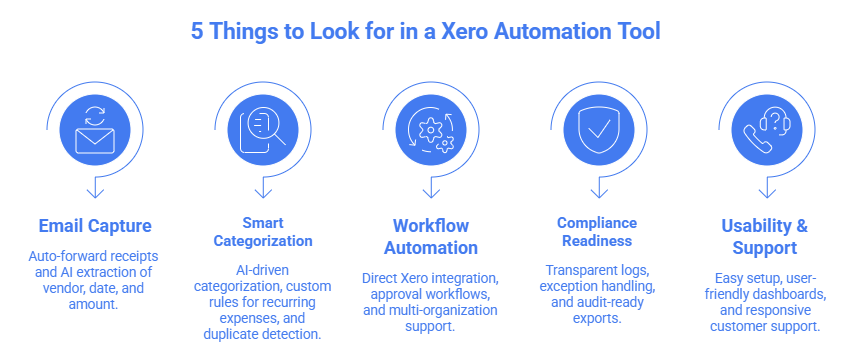
1. Email-First Document Capture
Why It Matters
For most businesses, receipts and bills arrive by email: whether from suppliers, subscription services, or travel bookings. Traditionally, these documents must be downloaded, renamed, and manually uploaded into Xero. This repetitive process consumes hours every month and increases the risk of missing or misfiled receipts.
An effective Xero automation tool should eliminate this manual step by offering email-first document capture.
Key Features to Look For
- The tool should connect seamlessly with Gmail or Outlook, automatically forwarding receipts and bills into Xero without manual uploads.
- Once captured, the tool should read key details like: vendor name, invoice number, date, amount, and tax information; directly from the email or attached PDF/image.
Retroactive inbox sweep
- Beyond new receipts, the tool should scan your inbox history to capture past bills and receipts, ensuring nothing is missed.
Multi-format support
- Whether receipts arrive as PDFs, images, or plain text emails, the tool should be able to process them accurately.
Automatic syncing
- Captured documents should flow directly into Xero’s “Bills” or “Receipts” section, ready for categorization and reconciliation.
Real-World Impact
Without email automation:
- Uploading 100 receipts manually can take 3-4 hours.
With email-first automation:
- The same 100 receipts are captured and processed in minutes, with no manual uploads required.
This feature alone can save businesses dozens of hours per month, while ensuring every receipt is accounted for.
For deeper implementation guides, see:
- How to Automatically Capture Receipts for Xero
- How to Turn Your Inbox into a Bookkeeping Workflow (for Xero Users)
2. Smart Categorization & Error Prevention
Why It Matters
Categorization is the backbone of bookkeeping. Every expense or income entry must be placed in the right account to ensure accurate reporting, tax compliance, and audit readiness. Manual categorization in Xero often leads to inconsistencies, misclassifications, and duplicate entries, which can distort financial statements and create problems during audits.
A strong automation tool should therefore go beyond basic rules and offer intelligent categorization with builtin error prevention.
Key Features to Look For
- The tool should learn from historical transactions, vendor behavior, and expense patterns to automatically suggest the most relevant category.
Custom rules
- Businesses should be able to define rules for recurring transactions (e.g., monthly subscriptions always categorized under “Software” or “Utilities”).
- Prevents double entries by flagging identical receipts or invoices before they are posted.
Exception handling
- Ambiguous or unusual transactions should be flagged for human review instead of being misclassified.
- Every categorization decision should be recorded, creating transparency for audits and compliance.
Real-World Impact
Without automation:
- Categorizing 100 receipts manually can take 2-3 hours, with a 5-10% error rate.
With smart automation:
- The same 100 receipts are categorized in minutes, with error rates dropping below 2% thanks to AI learning and duplicate detection.
This not only saves time but also ensures consistent, audit-ready records.
For deeper insights, see:
3. Integration & Workflow Automation
Why It Matters
Automation is only valuable if it fits seamlessly into your existing workflow. A tool that requires constant manual intervention or doesn’t integrate properly with Xero will create more frustration than efficiency. The best Xero automation tools should act as an extension of your accounting process, not a separate system you have to manage.
Key Features to Look For
- Transactions, receipts, and bills should sync automatically into Xero without the need for manual uploads or imports.
Approval workflows
- Role-based permissions allow managers, accountants, and staff to collaborate. For example, staff can upload receipts, while managers approve them before they hit the books.
- Accounting firms or businesses with multiple entities should be able to manage all organizations from a single dashboard.
Scalability
- The tool should handle thousands of documents without slowing down, ensuring it grows with your business.
Workflow automation
- Look for features like recurring transaction handling, automated reconciliation, and exception flagging to reduce repetitive tasks.
Real-World Impact
Without integration:
- Teams juggle multiple apps, manually upload receipts, and reconcile transactions separately.
With workflow automation:
- Receipts flow directly from inbox to Xero.
- Transactions are categorized and reconciled automatically.
- Managers approve exceptions in minutes, not hours.
This creates a streamlined, end-to-end bookkeeping process that saves time and reduces errors.
For practical examples, see:
- How to Turn Your Inbox into a Bookkeeping Workflow (for Xero Users)
- How to Automate Bookkeeping in Xero (Complete Guide for Business Owners)
4. Compliance & Audit Readiness
Why It Matters
Bookkeeping isn’t just about keeping track of expenses, it’s about ensuring that records are accurate, transparent, and compliant with tax regulations. When audits happen, businesses that rely on manual processes often scramble to find missing receipts, correct misclassifications, and justify inconsistencies. This not only wastes time but also increases stress and risk.
A strong Xero automation tool should make compliance effortless by building audit readiness into every step of the workflow.
Key Features to Look For
Transparent logs
- Every action from receipt capture to categorization should be recorded in a digital audit trail.
Exception handling
- Transactions that don’t fit normal patterns should be flagged for human review, ensuring accuracy without slowing down automation.
- The tool should allow you to generate reports that meet compliance standards, making it easy to share with auditors or regulators.
Duplicate prevention
- By eliminating duplicate entries, the system ensures that records are consistent and reliable.
Tax compliance support
- Automation should handle tax codes correctly, reducing the risk of under- or over-reporting.
Real-World Impact
Without automation:
- Audit preparation can take days or weeks, with accountants chasing missing receipts and correcting errors.
With compliance-focused automation:
- Audit preparation takes hours, with complete logs and categorized transactions ready to export.
- Businesses gain confidence knowing their records are always audit-ready.
For related reading, see:
- Can AI Really Do Bookkeeping?
- How to Automate Bookkeeping in Xero (Complete Guide for Business Owners)
5. Usability & Support
Why It Matters
Even the most advanced automation tool is useless if your team struggles to adopt it. Usability determines how quickly you can get started, how easily staff can interact with the system, and how effectively you can monitor automation. Strong customer support ensures that when issues arise, you’re not left waiting or guessing.
Key Features to Look For
Ease of setup
- The tool should be simple to install and configure, ideally getting you up and running in hours rather than weeks.
User-friendly dashboards
- Clear, intuitive dashboards allow you to monitor automation, track receipts, and review flagged exceptions without technical expertise.
Mobile accessibility
- A mobile-friendly interface ensures you can approve receipts or check reports on the go.
Customer support
- Look for responsive support teams that understand accounting workflows and can resolve issues quickly.
Training resources
- Tutorials, guides, and onboarding support help your team adopt the tool faster and with fewer mistakes.
Real-World Impact
Without usability:
- Teams waste time figuring out complex interfaces, leading to low adoption and errors.
With strong usability and support:
- Staff can capture receipts, approve transactions, and monitor automation with minimal training.
- Issues are resolved quickly, ensuring bookkeeping workflows remain uninterrupted.
For practical examples, see:
Conclusion
Choosing the right Xero automation tool means balancing speed, accuracy, compliance, scalability, and usability. Manual uploads and categorization are no longer sustainable as transaction volumes grow. Tools like Nifty AI stand out because they combine automation with human oversight, ensuring both efficiency and reliability.
For most businesses, the right automation tool is the one that saves time, reduces errors, keeps records audit-ready, and is easy for teams to adopt.